Scrolling Shooter Games Menu: Difference between revisions
imported>HRWikiMirrorBot Imported from hrwiki.org via Wayback Machine (HTML→wikitext) |
imported>HRWikiMirrorBot Imported from hrwiki.org via Wayback Machine (HTML→wikitext) |
||
| Line 1: | Line 1: | ||
<!-- Mirrored from Homestar Runner Wiki (hrwiki.org) via Wayback Machine; HTML converted to wikitext. Formatting may be imperfect. --> | <!-- Mirrored from Homestar Runner Wiki (hrwiki.org) via Wayback Machine; HTML converted to wikitext. Formatting may be imperfect. --> | ||
<div class="thumb tright"> | <div class="thumb tright"> | ||
| Line 21: | Line 19: | ||
</div> | </div> | ||
'''Scrolling Shooter Games Menu''' | '''Scrolling Shooter Games Menu''' is the current [[homestarrunner.com]] [[Games|games]] selection screen. It is styled from the vertical [[Scrolling shooter|scrolling shooter]] arcade games from the early '80s. The older games are available from the WWII style fighter, while the newer, more advanced games are selected from the fancy space fighters. The current [[20X6]] character whose power-up was most recently collected describes each game (see below for possible characters). | ||
'''Page Title:''' Shots do NOT hurt other players... yet. | '''Page Title:''' Shots do NOT hurt other players... yet. | ||
| Line 85: | Line 83: | ||
== <span class="mw-headline"> Easter Eggs </span> == | == <span class="mw-headline"> Easter Eggs </span> == | ||
* | * Click the center "Games Menu... [[1982]] Videlectrix.com" to go to the [[Videlectrix]] website. | ||
* Click on the level number to change the backgrounds | * Click on the level number to change the backgrounds. | ||
{| class="wikitable gallery" cellspacing="0" cellpadding="0" | {| class="wikitable gallery" cellspacing="0" cellpadding="0" | ||
| Line 102: | Line 100: | ||
</div> | </div> | ||
<div class="gallerytext"> | <div class="gallerytext"> | ||
</div> | </div> | ||
| Line 120: | Line 116: | ||
</div> | </div> | ||
<div class="gallerytext"> | <div class="gallerytext"> | ||
</div> | </div> | ||
| Line 138: | Line 132: | ||
</div> | </div> | ||
<div class="gallerytext"> | <div class="gallerytext"> | ||
</div> | </div> | ||
| Line 146: | Line 138: | ||
|} | |} | ||
* [[Power-up| | * When you collect one of the [[Power-up|power-ups]] that appear occasionally, the character ship and avatar changes accordingly. Initially upon page load, the character is [[1-Up]]. | ||
{| class=" | {| class="wikitable" border="1" cellspacing="0" cellpadding="6" style="border-collapse:collapse" | ||
|- bgcolor="#eeeeee" | |||
! Character | |||
! width="90"| Avatar<br /> | |||
<sup>(closed mouth)</sup> | |||
! width="90"| Avatar<br /> | |||
<sup>(open mouth)</sup> | |||
! width="90"| < | ! Ship | ||
! width="90"| < | ! Power-Up | ||
! | |||
! | |||
|- | |- | ||
| [[1-Up]] | |||
| [[File:Games Menu 1-Up.PNG|[[File:Games_Menu_1-Up.PNG|75px|thumb]]]] | |||
| [[File:Games Menu 1-Up (open).PNG|[[File:Games_Menu_1-Up_(open).PNG|75px|thumb]]]] | |||
| [[File:Games Menu 1-Up Ship.PNG|[[File:Games_Menu_1-Up_Ship.PNG|75px|thumb]]]] | |||
| [[File:Games Menu 1-Up Pill.PNG|[[File:Games_Menu_1-Up_Pill.PNG|75px|thumb]]]] | |||
|- | |- | ||
| [[Stinkoman]] | |||
| [[File:Games Menu Stinkoman.PNG|[[File:Games_Menu_Stinkoman.PNG|75px|thumb]]]] | |||
| [[File:Games Menu Stinkoman (open).PNG|[[File:Games_Menu_Stinkoman_(open).PNG|75px|thumb]]]] | |||
| [[File:Games Menu Stinkoman Ship.PNG|[[File:Games_Menu_Stinkoman_Ship.PNG|75px|thumb]]]] | |||
| [[File:Games Menu Stinkoman Pill.PNG|[[File:Games_Menu_Stinkoman_Pill.PNG|75px|thumb]]]] | |||
|- | |- | ||
| [[Pan Pan]] | |||
| [[File:Games Menu Pan Pan.PNG|[[File:Games_Menu_Pan_Pan.PNG|75px|thumb]]]] | |||
| [[File:Games Menu Pan Pan (open).PNG|[[File:Games_Menu_Pan_Pan_(open).PNG|75px|thumb]]]] | |||
| [[File:Games Menu Pam Pam Ship.PNG|[[File:Games_Menu_Pam_Pam_Ship.PNG|75px|thumb]]]] | |||
| [[File:Games Menu Pan Pan Pill.PNG|[[File:Games_Menu_Pan_Pan_Pill.PNG|75px|thumb]]]] | |||
|- | |- | ||
| [[Cheatball]] | |||
| [[File:Games Menu The Cheat.PNG|[[File:Games_Menu_The_Cheat.PNG|75px|thumb]]]] | |||
| [[File:Games Menu The Cheat (open).PNG|[[File:Games_Menu_The_Cheat_(open).PNG|75px|thumb]]]] | |||
| [[File:Games Menu The Cheat Ship.PNG|[[File:Games_Menu_The_Cheat_Ship.PNG|75px|thumb]]]] | |||
| [[File:Games Menu The Cheat Pill.PNG|[[File:Games_Menu_The_Cheat_Pill.PNG|75px|thumb]]]] | |||
|- | |- | ||
| [[Z Sabre]] | |||
| [[File:Games Menu Coach Z.PNG|[[File:Games_Menu_Coach_Z.PNG|75px|thumb]]]] | |||
| [[File:Games Menu Coach Z (open).PNG|[[File:Games_Menu_Coach_Z_(open).PNG|75px|thumb]]]] | |||
| [[File:Games Menu Coach Z Ship.PNG|[[File:Games_Menu_Coach_Z_Ship.PNG|75px|thumb]]]] | |||
| [[File:Games Menu Coach Z Pill.PNG|[[File:Games_Menu_Coach_Z_Pill.PNG|75px|thumb]]]] | |||
|} | |} | ||
| Line 223: | Line 212: | ||
* The score can't move above 0. | * The score can't move above 0. | ||
* Loading the page up with Flash Player 6 will cause the browser to complain about a script in the background making everything run slowly. If cancel is selected, it will cause the menu to cease loading the levels (thus showing "Level", without any numeric value assigned, leaving a blank screen), cause the sprite to go haywire (it will go through every morphing and moving animation over and over and over) and have some characters say an otherwise unused message ("''Trogdor is the Greatest Game! Play 2Nite!''"). | * Loading the page up with Flash Player 6 will cause the browser to complain about a script in the background making everything run slowly. If cancel is selected, it will cause the menu to cease loading the levels (thus showing "Level", without any numeric value assigned, leaving a blank screen), cause the sprite to go haywire (it will go through every morphing and moving animation over and over and over) and have some characters say an otherwise unused message ("''Trogdor is the Greatest Game! Play 2Nite!''"). | ||
** Note: The message "TROGDOR IS THE GREATEST GAME! PLAY 2NITE!!" is actually the default value of the text box. It is replaced with another message when the mouse | ** Note: The message "TROGDOR IS THE GREATEST GAME! PLAY 2NITE!!" is actually the default value of the text box. It is replaced with another message when you move the mouse over an item. The text is never seen unless all ActionScript is aborted, which happens when you get the "running slowly" dialog box described above and choose to stop running scripts. | ||
* When [[Thy Dungeonman 3]] was added to the games menu, it briefly [[File:GamesMenuWithDungeonMan3WithoutRhinoFeeder.PNG|replaced RhinoFeeder]]. | * When [[Thy Dungeonman 3]] was added to the games menu, it briefly [[File:GamesMenuWithDungeonMan3WithoutRhinoFeeder.PNG|replaced RhinoFeeder]]. | ||
* [[Dangeresque Roomisode 1: Behind the Dangerdesque|Dangeresque Roomisode 1: Behind The Dangerdesque]] was briefly missing from the menu after the January 2021 Ruffle update. The description was changed upon its return. | * [[Dangeresque Roomisode 1: Behind the Dangerdesque|Dangeresque Roomisode 1: Behind The Dangerdesque]] was briefly missing from the menu after the January 2021 Ruffle update. The description was changed upon its return. | ||
| Line 258: | Line 247: | ||
</div> | </div> | ||
* Grab a slow character's pill (Z Sabre or Pan Pan) and go to one of the far sides and quickly scroll to the other side and click on one of the games. | * Grab a slow character's pill (Z Sabre or Pan Pan) and go to one of the far sides and quickly scroll to the other side and click on one of the games. Your character's laser will shoot out from where the ship was and the game you clicked on will still explode even if the laser isn't anywhere near it. | ||
* | * If you click on a game-ship in the far left and scroll very fast to the right (or vice-versa) with a fast character's pill, your ship will disappear unless you navigate to the opposite direction you went. | ||
* After clicking on the SBCG4AP demo download, the other buttons and the speech bubbles don't work anymore. | * After clicking on the SBCG4AP demo download, the other buttons and the speech bubbles don't work anymore. | ||
* | * If you grab a character pill right as the ship you clicked on blows up, the game's page will not load. | ||
* If | * If you manage to fire two shots at one time, the first one will hit the ship you clicked on, and if the second one hits a ship, they will all simultaneously explode. It will then begin the game that was clicked. | ||
<span id="fixed-glitches"></span> | <span id="fixed-glitches"></span> | ||
| Line 283: | Line 272: | ||
* The quote for Awexome Cross refers to the sidescrolling shooter series named ''[[Rolling Thunder (arcade game)|Rolling Thunder]]'' (by [[Namco]], 1986). | * The quote for Awexome Cross refers to the sidescrolling shooter series named ''[[Rolling Thunder (arcade game)|Rolling Thunder]]'' (by [[Namco]], 1986). | ||
* The power-ups fall down in the same fashion as the game ''[[Arkanoid]]'', in which falling pill-like objects would change the appearance and ability of the ship below. | * The power-ups fall down in the same fashion as the game ''[[Arkanoid]]'', in which falling pill-like objects would change the appearance and ability of the ship below. | ||
* The falling pills are also quite reminiscent of the old computer game Mac Brickout 3.4, in which falling, rotating pills with letters on them would grant | * The falling pills are also quite reminiscent of the old computer game Mac Brickout 3.4, in which falling, rotating pills with letters on them would grant your paddle special abilities. | ||
* The "Ready!" text that | * The "Ready!" text that you see when you enter the menu is from the [[Nintendo|NES]] ''[[Mega Man Classic|Mega Man]]'' games (among other games such as [[Bubble Bobble]]); that is, it uses a similar font and placement. | ||
* The continually rolling "1982 Videlectrix" bar at the bottom is a reference to a similar animation that appeared in most [[Atari 2600]] games made by [[Activision]]. | * The continually rolling "1982 Videlectrix" bar at the bottom is a reference to a similar animation that appeared in most [[Atari 2600]] games made by [[Activision]]. | ||
* The page title, "Shots do NOT hurt other players...yet." is from the classic arcade game ''[[Gauntlet (arcade game)|Gauntlet]]''. | * The page title, "Shots do NOT hurt other players...yet." is from the classic arcade game ''[[Gauntlet (arcade game)|Gauntlet]]''. | ||
| Line 296: | Line 285: | ||
=== <span class="mw-headline"> Fast Forward </span> === | === <span class="mw-headline"> Fast Forward </span> === | ||
* | * You can [[Stinkoman 20X6 Playable Characters|play as]] Stinkoman's ship, the Stinkowing, in [[Stinkoman 20X6 Walkthrough Level 9|Level 9]] of the game [[Stinkoman 20X6]]. | ||
<span id="external-links"></span> | <span id="external-links"></span> | ||
== <span class="mw-headline"> External Links </span> == | == <span class="mw-headline"> External Links </span> == | ||
* [https://homestarrunner.com/ | * [https://homestarrunner.com/games view the Games Menu] | ||
* [https://old.homestarrunner.com/games.html view the Games Menu] on the old [[Flash]] site | * [https://old.homestarrunner.com/games.html view the Games Menu] on the old [[Flash]] site | ||
* [https://old.homestarrunner.com/gamesmenu_new.swf view the Flash file for the Games Menu] | * [https://old.homestarrunner.com/gamesmenu_new.swf view the Flash file for the Games Menu] | ||
| Line 328: | Line 317: | ||
<div id="mw-normal-catlinks"> | <div id="mw-normal-catlinks"> | ||
[/wiki/Special:Categories Categories]: <span dir="ltr">[[Category:H*R Navigation|H*R Navigation]]</span> | <span dir="ltr">[[Category: | [/wiki/Special:Categories Categories]: <span dir="ltr">[[Category:H*R Navigation|H*R Navigation]]</span> | <span dir="ltr">[[Category:Games|Games]]</span> | <span dir="ltr">[[Category:20X6|20X6]]</span> | ||
</div> | </div> | ||
Revision as of 01:53, 14 July 2026

The current Games menu
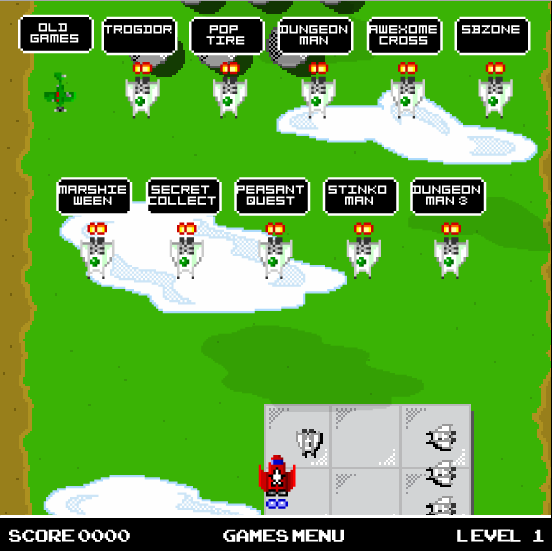
Scrolling Shooter Games Menu is the current homestarrunner.com games selection screen. It is styled from the vertical scrolling shooter arcade games from the early '80s. The older games are available from the WWII style fighter, while the newer, more advanced games are selected from the fancy space fighters. The current 20X6 character whose power-up was most recently collected describes each game (see below for possible characters).
Page Title: Shots do NOT hurt other players... yet.
Date: July 29, 2004
Contents
|
Available Games
- Old Games — So old they are new! Maybe you forgot!
- Trogdor — One armed dragon might! Thrilling level!
- Pop Tire — Bouncing tire Challenge! Begin at once!
- Dungeonman — Type an adventure! Keyboard to the max!
- Dungeonman 2 — Two times the text! One times the fun!
- Dungeonman 3 — Text and graphics! Orange adventure!
- Awexome Cross — Rolling Cheat thunder! Grab n go cash!
- SBZone — Avoiding shaped attacks in a Strong Bad Zone!
- Marshie Ween — Switching colored treats! Floating delights!
- Secret Collect — A flashing maze to create many times!
- RhinoFeeder — Mighty zoo animal! Elude a snake!
- Peasant Quest — Robed peasant hero! Text and graphic style!
- Stinkoman — Sidemost scrolling! Stinkoman presents!
- Duck Guard 1 — Save a duck! Save the planet!
- Wheres Egg — Who is a liar! Find an egg!
- Kid Speedy — Avoid the sweets! Get the fleet feets!
- Racewalk — Left right left right! Buy sell buy sell unngh!
- Pigs on Head — Catch those pigs! Ham and watch gallery!
- Hallrunner — Spraypaint the walls! Trash the halls!
- Stinko Comix — Make your own comics! Sprite based humors!
- Dangeresque — Point and click around a room! WASD too!
- Old description — Roomisodic gaming is a gamechanger! Videlectrix tells a better tale!
Previously Available Games
- Wii Games — Old games made for Wii! Wave it all around!
- SBCG4AP Demo — Real type game for PC and Wii! Try out the PC demo!
Easter Eggs
- Click the center "Games Menu... 1982 Videlectrix.com" to go to the Videlectrix website.
- Click on the level number to change the backgrounds.
|
|
|


- When you collect one of the power-ups that appear occasionally, the character ship and avatar changes accordingly. Initially upon page load, the character is 1-Up.
| Character | Avatar (closed mouth) |
Avatar (open mouth) |
Ship | Power-Up |
|---|---|---|---|---|
| 1-Up | 
|
.PNG)
|

|

|
| Stinkoman | 
|
.PNG)
|

|

|
| Pan Pan | 
|
.PNG)
|

|

|
| Cheatball | 
|
.PNG)
|

|

|
| Z Sabre | 
|
.PNG)
|

|

|
Fun Facts
Trivia

Screenshot of the New Games page when played using Flash Player 6; note the unused TROGDOR! message.
- When this menu was first released, the information bar at the bottom (score, brand, level) was not there. It was added shortly thereafter.
- When viewing the Flash file, a small green line floats to the bottom on the left side in level 3.
- This is the debut of Cheatball and Z Sabre.
- It also marks the first time Z Sabre's face was ever shown unhidden, long before he is confirmed to be the then-hidden villain of Stinkoman 20X6.
- The score can't move above 0.
- Loading the page up with Flash Player 6 will cause the browser to complain about a script in the background making everything run slowly. If cancel is selected, it will cause the menu to cease loading the levels (thus showing "Level", without any numeric value assigned, leaving a blank screen), cause the sprite to go haywire (it will go through every morphing and moving animation over and over and over) and have some characters say an otherwise unused message ("Trogdor is the Greatest Game! Play 2Nite!").
- Note: The message "TROGDOR IS THE GREATEST GAME! PLAY 2NITE!!" is actually the default value of the text box. It is replaced with another message when you move the mouse over an item. The text is never seen unless all ActionScript is aborted, which happens when you get the "running slowly" dialog box described above and choose to stop running scripts.
- When Thy Dungeonman 3 was added to the games menu, it briefly
 .
. - Dangeresque Roomisode 1: Behind The Dangerdesque was briefly missing from the menu after the January 2021 Ruffle update. The description was changed upon its return.

Remarks
- Each ship has a different maneuverability. From fastest to slowest: Cheatball, Stinkoman, 1-Up, Z Sabre, and Pan Pan.
- While most of the website fits into a small rectangle with rounded edges, this menu has proportions more like that of an arcade cabinet's monitor, with sharp edges.
- Despite using 20X6 characters, each pill uses the initials of the normal characters e.g. H is for Homestar. The ships are also designed off of the normal non-20X6 characters, the most obvious example being Pan Pan's Pom Pom-shaped spaceship.
- Pan Pan opens and closes his mouth to make it appear that he speaks normal words, although he has been shown to communicate by bouncing, as seen in Under Construction.
- Aside from shading, all of the ships are symmetrical, except for the Z-Wing's Z and the Cheat Wedge's spots.
Glitches

Disappearing act
- Grab a slow character's pill (Z Sabre or Pan Pan) and go to one of the far sides and quickly scroll to the other side and click on one of the games. Your character's laser will shoot out from where the ship was and the game you clicked on will still explode even if the laser isn't anywhere near it.
- If you click on a game-ship in the far left and scroll very fast to the right (or vice-versa) with a fast character's pill, your ship will disappear unless you navigate to the opposite direction you went.
- After clicking on the SBCG4AP demo download, the other buttons and the speech bubbles don't work anymore.
- If you grab a character pill right as the ship you clicked on blows up, the game's page will not load.
- If you manage to fire two shots at one time, the first one will hit the ship you clicked on, and if the second one hits a ship, they will all simultaneously explode. It will then begin the game that was clicked.
Fixed Glitches
- When the site was originally updated for Ruffle, the menu was stuck on level 3 and the animated elements in the background were not visible. This was fixed days later, but as a result, the page was changed to the standard aspect ratio, making some objects visible beyond the edge of the menu. This was also fixed.
Inside References
- The description for 50K Racewalker includes the line "Buy sell buy sell!", which Stinkoman previously used in Twenty THANXty Six.
Real-World References
- The levels are all inspired by classic video games.
- The quote for Awexome Cross refers to the sidescrolling shooter series named Rolling Thunder (by Namco, 1986).
- The power-ups fall down in the same fashion as the game Arkanoid, in which falling pill-like objects would change the appearance and ability of the ship below.
- The falling pills are also quite reminiscent of the old computer game Mac Brickout 3.4, in which falling, rotating pills with letters on them would grant your paddle special abilities.
- The "Ready!" text that you see when you enter the menu is from the NES Mega Man games (among other games such as Bubble Bobble); that is, it uses a similar font and placement.
- The continually rolling "1982 Videlectrix" bar at the bottom is a reference to a similar animation that appeared in most Atari 2600 games made by Activision.
- The page title, "Shots do NOT hurt other players...yet." is from the classic arcade game Gauntlet.
- The way the dialogue is displayed (along with the person speaking) resembles the Star Fox games.
- The scrollover noise is the jumping noise from the Atari 5200 game Montezuma's Revenge (by Parker Brothers, 1984).
- The noise played after a ship is destroyed and before the new page loads is a sound effect from Paradroid.
- The Pigs On Head description includes the text "Ham and watch gallery!", which refers to the Game & Watch Gallery series of games, which Pigs On Head resembles.
- The old description for Dangeresque Roomisode 1 likely referred to Telltale Games, which was famous for its episodic point-and-click adventure games. The studio closed in the time between the game's release and the post-Flash update, which is likely why the text was changed.
Fast Forward
- You can play as Stinkoman's ship, the Stinkowing, in Level 9 of the game Stinkoman 20X6.
External Links
- view the Games Menu
- view the Games Menu on the old Flash site
- view the Flash file for the Games Menu
- view the Old Games Menu
- view the Old Games Menu on the old Flash site
- view the Flash file for the Old Games Menu
| Preceded by: |
Games Navigation July 29, 2004-Present |
Succeeded by: N/A |
[/wiki/Special:Categories Categories]: | |
